UK's No. 1 Cisco & Meraki Authorised Partner and Supplier


For a growing UK business, the best network switches are managed gigabit switches with PoE+ support, 10G uplinks, and centralised cloud or on-premises management. The right choice depends on four factors: how many users and devices you need to connect, whether you run Wi-Fi access points, IP phones, or CCTV cameras that need Power over Ethernet, how your IT team manages the network, and whether you have multiple sites. For most UK businesses scaling from 10 to 250 users, Cisco Meraki MS switches or Cisco Catalyst switches represent the most reliable, supportable, and future-proof options available.


This guide covers everything you need to make the decision confidently, from switch types and port counts to PoE budgets, management models, and the Meraki versus Catalyst question that comes up in almost every growing business conversation.

What this guide covers:
A network switch is the device that connects all the wired equipment on your business network: computers, wireless access points, IP phones, printers, servers, CCTV cameras,
and door entry systems. It receives data from one device and forwards it to the correct destination, rather than broadcasting to every connected device as older hubs did.
The practical implication: as your business adds more devices, more staff, or more sites, the switch becomes the foundation everything else depends on. A switch that was adequate for 15 people rarely scales cleanly to 60 without either replacement or careful planning.
There are three broad categories of business switch, and the differences matter significantly for a growing organisation.
| Type | Configuration | VLAN support | PoE available | Typical UK price (ex VAT) | Best for |
|---|---|---|---|---|---|
| Unmanaged | None (plug and play) | No | Some models | £20-£80 | Micro offices, single-room setups |
| Smart managed | Web interface | Basic | Yes | £80-£300 | SMBs with basic segmentation needs |
| Fully managed (Layer 2/3) | CLI or cloud dashboard | Full | Yes | £300-£2,000+ | Growing businesses, multi-site, IT-managed |
For a business with more than 10 staff, more than one Wi-Fi access point, or any IP phones or CCTV cameras, a fully managed switch is almost always the right choice. The ability to create VLANs (separate network segments for staff, guests, and IoT devices), prioritise voice traffic, and monitor the network remotely is not a luxury at this scale; it is a practical necessity.
The rule of thumb: the moment you introduce IP cameras, VoIP handsets, or a separate guest Wi-Fi network, you need a managed switch. Unmanaged switches treat every connected device as part of one flat, uncontrolled network.
How Many Ports Do You Actually Need? Port count is the most common area where businesses underspecify. The instinct is to count current desks and order a switch that fits. The problem is that switches are typically installed for five to seven years, and a 24-port switch that feels generous on day one can fill up quickly.






Before choosing a port count, list every device that will connect by cable:
A business with 20 staff might actually need 35-40 ports once access points, phones, and cameras are counted. Then add 20% headroom for growth.
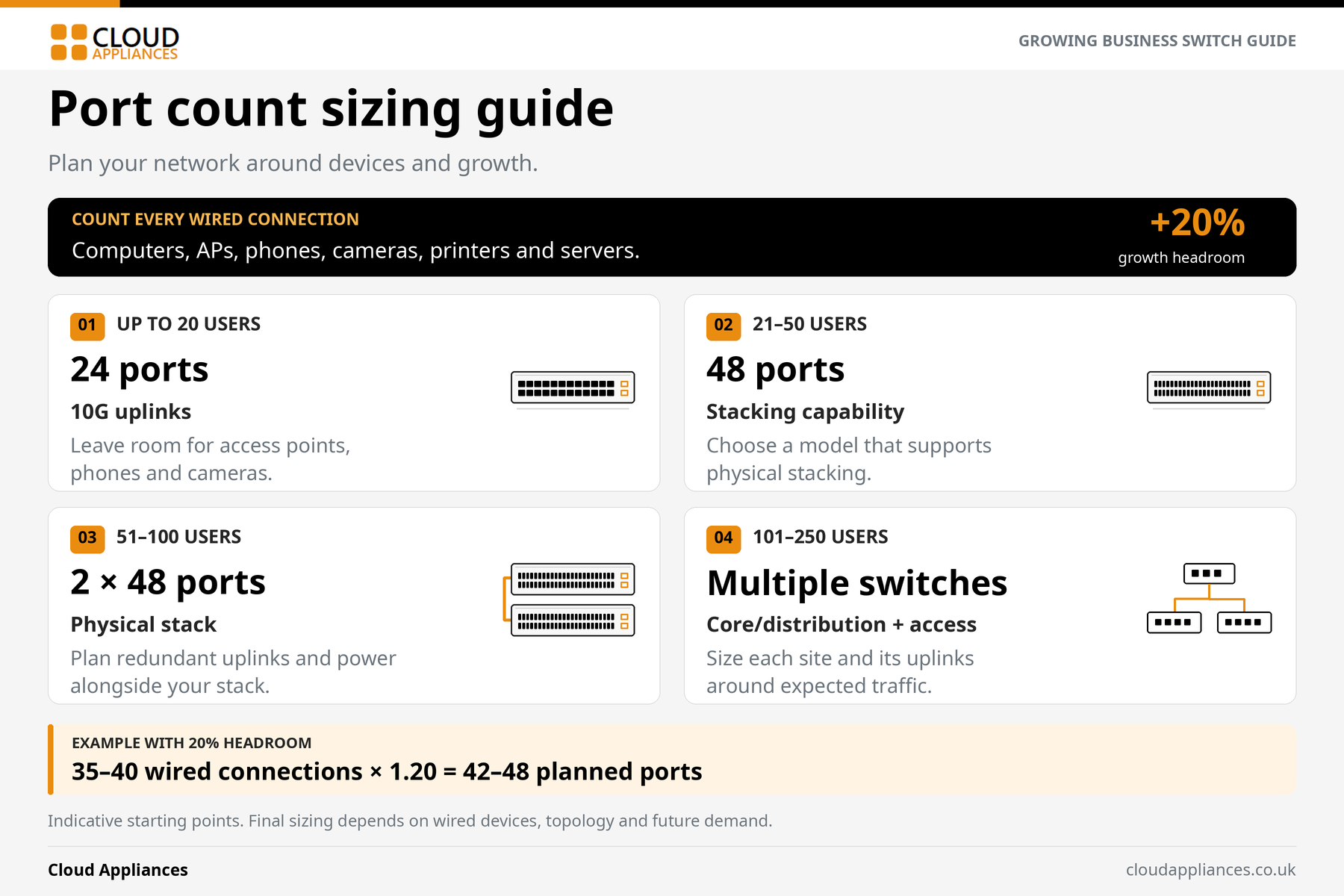
On uplink ports: every access-layer switch should have at least two 10G SFP+ uplink ports. Gigabit uplinks to a core switch or firewall create a bottleneck as traffic from multiple users and access points converges. The Cisco Meraki MS150 series and Catalyst 9300 series both include 10G SFP+ uplinks as standard, which is one reason they remain the sensible choice for growing businesses rather than cheaper alternatives.
Key point: buying a 24-port switch when you need 22 ports today is a false economy. Expansion to 30 devices means buying a second switch, adding cost and complexity. Sizing up at purchase is almost always cheaper.
Power over Ethernet (PoE) lets a network cable carry both data and electrical power to a connected device. This eliminates the need for a separate power adapter at every Wi-Fi access point, IP phone, CCTV camera, or door entry panel. For a growing business, PoE is not optional: it is the practical way to deploy these devices cleanly and cost-effectively.
| Standard | Max power per port | Common devices powered |
|---|---|---|
| PoE (802.3af) | 15.4W | Basic IP phones, older access points |
| PoE+ (802.3at) | 30W | Most modern access points, PTZ cameras, phones |
| PoE++ (802.3bt) | 60W or 90W | Wi-Fi 6/7 access points, video conferencing units, some digital signage |
Most growing businesses need PoE+ as a minimum. Wi-Fi 6 and Wi-Fi 7 access points increasingly require PoE++ (60W) to operate at full capacity, so a switch purchased today should ideally support 802.3bt on at least some ports.
This is where many businesses make a costly mistake. A switch marketed as “24-port PoE+” might have a total power budget of only 185W. If you connect 10 access points drawing 25W each, you have already consumed 250W, which exceeds the budget. Devices will either not power on or will be throttled.
Always calculate your total PoE draw before purchasing:
Example: a 30-person office with 4 Wi-Fi access points (20W each), 20 VoIP phones (6W each), and 6 CCTV cameras (15W each) needs: 80W + 120W + 90W = 290W minimum. A switch with a 370W+ budget is the correct choice, not one with 185W.
The Cisco Meraki MS150-48LP offers 370W total PoE budget across 48 ports, making it well-suited to exactly this kind of mixed deployment.
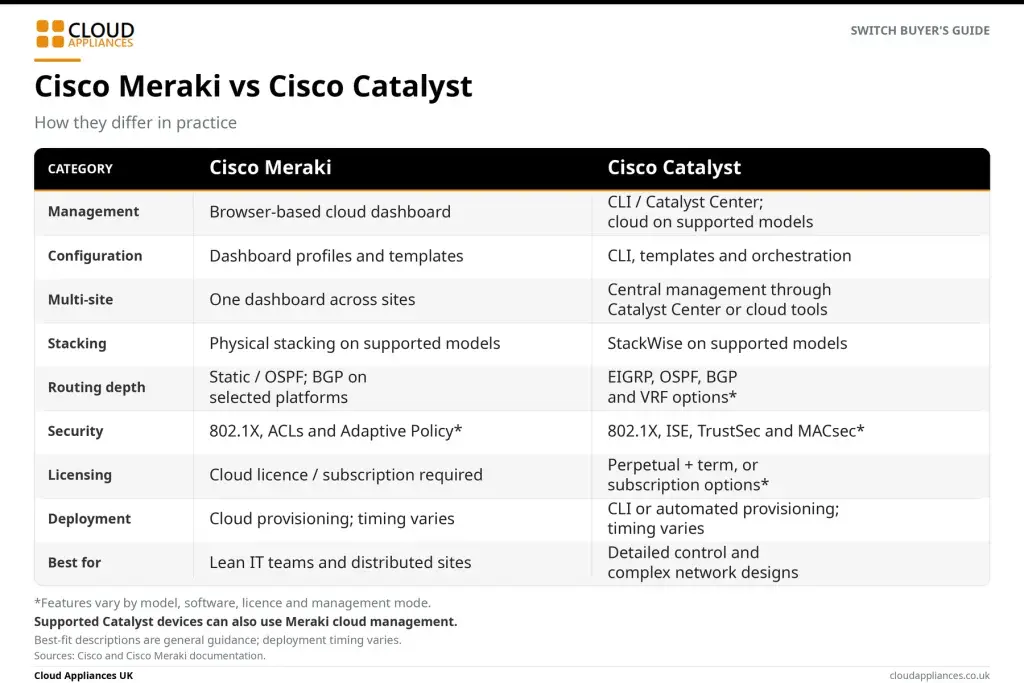
Cisco Meraki vs Cisco Catalyst: Which Is Right for a Growing Business? This is the question Cloud Appliances fields most often from growing UK businesses. Both are Cisco products. Both are enterprise-grade. The difference is not quality; it is operating model, management approach, and total cost of ownership over time.
The short answer: Meraki suits most growing businesses. Catalyst suits organisations with a dedicated network engineering team or complex routing requirements.
Meraki’s recurring licence is the most common objection. Hardware costs are comparable to Catalyst, but the licence adds approximately 30-50% of hardware cost per year. The honest comparison has to include what that licence displaces.
For a 50-person UK office over five years, a Meraki deployment (access points, switches, firewall with licences) runs approximately £15,800. An equivalent Catalyst deployment including SmartNet support, Catalyst Center licensing, and engineering time runs approximately £23,200. The Meraki option is roughly 32% lower in total five-year cost, primarily because it eliminates the management platform cost and reduces ongoing engineering overhead significantly.
The Meraki versus Catalyst distinction is less binary than it was. Cisco now offers cloud- managed Catalyst switches that run IOS-XE but are managed through the Meraki dashboard. This means businesses that want Catalyst’s routing depth but Meraki’s operational simplicity can have both. For growing businesses, this is a significant development: you are no longer choosing between simplicity and capability.
The recommendations below are based on what Cloud Appliances typically specifies for UK businesses at each growth stage. These are not the cheapest options; they are the ones that hold up as the business scales.
The Meraki MS130-24P is a Layer 2 access switch with 24 x 1GbE PoE+ ports (370W total budget), and 4 x 1G SFP uplinks. It is cloud-managed from day one, requires no on-site configuration, and joins the Meraki dashboard automatically.
Best for: small offices deploying Wi-Fi access points, a handful of IP phones, and basic CCTV. The 370W PoE budget suits light-to-moderate deployments.
Limitation to know: the 1G SFP uplinks are adequate for this scale but will become a bottleneck if the business grows significantly. Businesses anticipating rapid growth should consider the MS150 from the outset.
The MS150-48LP-4X is a Layer 2 switch with 48 x 1GbE ports, 370W total PoE budget, and 4 x 10G SFP+ uplinks. It supports multigigabit on select ports for Wi-Fi 6 and Wi-Fi 7 access points. This is the most commonly specified switch for growing UK SMEs.
Best for: offices with a mix of PoE devices, modern Wi-Fi, and a need for 10G uplinks to a firewall or core switch. The 370W budget handles mixed deployments comfortably.
Key advantage: the 10G SFP+ uplinks future-proof the connection to your firewall or internet edge for several years.
At this scale, PoE budget becomes the primary constraint. The MS150-48FP provides 740W total PoE across 48 ports, enough for high-density access point and camera deployments. Alternatively, the Cisco Catalyst 9300-48P offers 437W PoE budget with full IOS-XE management and physical StackWise stacking.
Choose MS150-48FP when: you want cloud management, have a lean IT team, and need maximum PoE headroom.
Choose Catalyst 9300 when: you have engineering resources, need physical stacking for resilience, or require advanced routing at the access layer.
At this scale, a single switch is rarely sufficient. Most deployments use two or more switches either physically stacked (Catalyst StackWise) or virtually stacked (Meraki dashboard). The Catalyst 9300 series introduces full Layer 3 switching with dynamic routing protocols, 10G access ports, and multigigabit options, making it appropriate for environments where the access layer needs routing intelligence.
Key consideration at this scale: you are now building a two-layer network (access and distribution), which requires planning the uplink architecture carefully. Cloud Appliances can design and quote this as a complete solution.
For businesses with two or more offices, Meraki’s unified dashboard is a decisive advantage. Configuration templates mean a new site can be provisioned in minutes rather than days. Firmware updates, alerting, and network visibility are consistent across every location from a single browser tab, without a separate management server to maintain.
Cloud Appliances note: as an authorised Cisco and Meraki partner, we supply, configure, and support the full Meraki and Catalyst switch range with next-day delivery across the UK. We also offer pre-sales design consultancy, installation, and ongoing managed support if you prefer not to manage the network in- house.
Key Features to Look for in a Business Switch Beyond port count and PoE, these are the features that separate a switch that works today from one that supports the business for the next five years.
VLANs (Virtual Local Area Networks) let you segment traffic without separate physical cabling. A well-configured business network typically has separate VLANs for staff devices, guest Wi-Fi, VoIP phones, CCTV cameras, and IoT equipment. This improves security (a compromised camera cannot reach your file server) and performance (voice traffic is kept separate from bulk data).
Any managed switch supports VLANs. The question is how easily they can be configured and maintained. Meraki’s dashboard makes VLAN configuration straightforward for non- specialists; Catalyst requires CLI knowledge or Catalyst Center.
QoS prioritises certain types of traffic, most importantly voice calls, so that a large file download does not degrade call quality. For any business running VoIP phones, QoS is not optional. All managed switches support QoS; the implementation varies by platform.

Business-grade switches from Cisco carry multi-year hardware warranties and access to technical support. Meraki’s licence includes firmware updates and dashboard access; Catalyst’s SmartNet contract covers hardware replacement and TAC support. For UK businesses, Cisco’s UK support line is available for SMB products on 0800 917 5473.
A note on budget alternatives: cheaper switches from consumer-grade brands may appear to offer similar specifications at a fraction of the cost. For a growing business, the hidden cost is in management overhead, reliability over time, and the absence of enterprise support when something fails. The switch is not the place to cut corners in a business network.
These are the questions Cloud Appliances asks every customer before specifying a switch. Working through them before contacting a supplier saves time and produces a more accurate quote.
A pre-sales conversation with Cloud Appliances typically takes 20-30 minutes and results in a specific recommendation with a written quote, including licences, accessories, and installation if required.
The best network switch for a growing business is a managed gigabit switch with adequate PoE budget, 10G uplinks, and a management model that matches your IT team’s capacity.
For most UK businesses scaling from 10 to 250 users, the decision comes down to:
| Business profile | Recommended switch | Why |
|---|---|---|
| Up to 25 users, lean IT | Meraki MS130-24P | Cloud management, easy deployment, adequate PoE |
| 25-75 users, mixed PoE devices | Meraki MS150-48LP | 370W PoE, 10G uplinks, scales cleanly |
| 75-150 users, high PoE density | Meraki MS150-48FP | 740W PoE, full cloud management |
| 75-150 users, engineering team | Cisco Catalyst 9300-48P | Physical stacking, full IOS-XE, advanced security |
| 150-250 users, multi-switch architecture | Stacked Catalyst 9300 | Layer 3 switching, multi-switch architecture |
| Multi-site business | Meraki (any model) | Unified dashboard, zero-touch provisioning |
The most common mistake is buying a switch sized for today rather than three years from now. Port count and PoE budget are both harder to expand than they appear; sizing up at purchase is almost always the right call.
The second most common mistake is choosing an unmanaged or consumer-grade switch to save money, then discovering the limitations when VoIP quality degrades, CCTV cameras need isolating, or a remote site needs troubleshooting from head office.
Cloud Appliances is an authorised Cisco and Meraki partner supplying the full switch range to UK businesses, with next-day delivery, pre-sales consultancy, and optional installation and managed support. Contact the team for a no-obligation quote or to discuss the right specification for your network.